
A medical HMI (Human Machine Interface) is the part of a medical device that people use every day. It includes buttons, displays, touchscreens, graphic overlays, and membrane switches. A good interface helps doctors, nurses, technicians, and other healthcare workers use equipment safely and with confidence.
Medical devices are often used in busy hospitals, clinics, and laboratories. Staff may need to make quick decisions while caring for patients. If the controls are confusing or hard to read, users may slow down or press the wrong button. A clear medical device interface helps people complete tasks faster and with fewer mistakes.
Good user interface design is about making equipment simple to understand. It gives users clear information, easy-to-find controls, and feedback that lets them know the device is working as expected. These small design choices can make a big difference in medical equipment usability and the overall healthcare user experience.
Why Interface Clarity Matters
Healthcare workers often use many different medical devices during a single shift. Each device may have its own buttons, displays, and menus. If every interface looks different, users need more time to learn how each one works.
A clear medical HMI helps users find the right control quickly. It also makes important information easier to see. This is especially helpful during busy situations when every second counts.
Poor interface design can lead to problems such as: 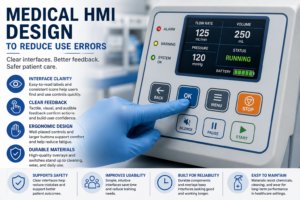
- Buttons that are too small
- Labels that are hard to read
- Similar controls placed too close together
- Status lights that are difficult to see
- Menus with too many options
These issues may slow users down or increase confusion. A simple layout can help users stay focused on patient care instead of searching for controls.
Best Practices for Medical HMI Design
Keep the Interface Simple
The best interfaces are easy to understand. Users should know what each button does without reading a long manual.
Good design often includes:
- Clear labels
- Easy-to-read fonts
- Simple icons
- Logical button placement
- Consistent colors
These features improve interface readability and help users complete tasks with less effort.
Group Related Controls
Buttons that perform similar tasks should be placed together. This makes the interface feel organized and helps users work faster.
For example, alarm controls should stay together. Display settings should also be grouped in one area instead of being spread across the control panel.
A clean layout makes the medical device interface easier to learn and easier to remember.
Give Clear Feedback
Users should know right away that the device received their input.
Feedback may include:
- A button that clicks when pressed
- A light that turns on
- A message on the display
- A short confirmation sound
This feedback gives users confidence that the device responded correctly.
Many medical devices use membrane switch design with tactile domes. These switches provide a physical click when pressed, making them easy to use even when operators wear gloves.
Design for Real Users
Medical equipment is used by many different people. Some users have years of experience. Others may be using the equipment for the first time.
A good ergonomic interface works well for everyone.
Designers should think about:
- Left- and right-handed users

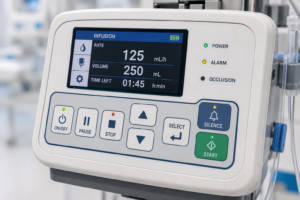
- People wearing gloves
- Different lighting conditions
- Standing and seated positions
- Fast-paced work environments
When equipment is comfortable to use, users can focus more on patient care.
Choosing the Right Interface Components
A medical HMI must also stand up to daily use. Hospitals clean equipment often with strong disinfectants. Labels and graphics should stay clear after many cleaning cycles.
High-quality control panel overlays help protect printed graphics from wear. They also keep labels easy to read over the life of the product.
Many manufacturers choose durable materials because they can help maintain a professional appearance while protecting the interface.
Common interface components include:
- Graphic overlays
- Membrane switches
- Backlit control panels
- Durable labels
- Printed faceplates
Each part should be selected based on the needs of the application.
Human Factors Engineering Makes a Difference
Human factors engineering looks at how people interact with products. The goal is to make devices easier and more comfortable to use.
During development, manufacturers often watch people use a prototype. They look for places where users hesitate or make mistakes.
For example, testing may show that two buttons look too similar. Changing the shape, color, or spacing can make the controls easier to understand.
These small improvements can create a better healthcare user experience without changing the device’s main function.
Test Before Production
Testing is an important part of medical HMI design.
Manufacturers often build prototypes before full production begins. These early versions allow designers to gather feedback and make changes before finalizing the design.
Testing may include:
- Checking that labels are easy to read
- Evaluating button placement
- Confirming tactile feedback
- Testing graphic overlays after repeated cleaning
- Reviewing the interface under different lighting conditions
These steps help improve medical equipment usability and support a better user experience.
Medical HMI Design Checklist
 Before production begins, review the interface carefully.
✔ Controls are grouped by function.
✔ Labels are easy to read.
✔ Important buttons stand out.
✔ Text has good contrast.
✔ Buttons are large enough for gloved hands.
✔ Feedback confirms every button press.
✔ Graphic overlays resist wear and cleaning.
✔ Membrane switches provide consistent tactile feedback.
✔ Prototype testing has been completed.
✔ User feedback has been reviewed.
Following a simple checklist helps manufacturers build interfaces that are easier to use and easier to maintain.
Frequently Asked Questions
What is a medical HMI?
A medical HMI is the part of a medical device that allows people to interact with the equipment. It may include buttons, touchscreens, membrane switches, displays, and graphic overlays.
Why is interface readability important?
Clear interface readability helps users find controls quickly and understand information without confusion. This can improve workflow in busy healthcare settings.
What are control panel overlays?
Control panel overlays are printed graphic layers placed over buttons and controls. They protect the interface while providing clear labels and graphics.
Why are membrane switches used in medical devices?
A well-designed membrane switch design can provide tactile feedback, sealed construction, and reliable operation. They are commonly used because they are durable and easy to clean.
Conclusion
A well-designed medical HMI helps healthcare workers use equipment with confidence. Clear layouts, readable labels, simple controls, and reliable feedback all work together to improve the user experience.
By focusing on good user interface design, human factors engineering, durable control panel overlays, and quality membrane switch design, manufacturers can create medical device interfaces that are easier to use and built for demanding healthcare environments.
NFI works with medical device manufacturers to produce durable membrane switches, graphic overlays, industrial labels, and identification products that support long-term performance. Contact NFI to discuss durable labeling solutions for your medical equipment, user interface components, or product identification needs.