

Advanced communication hardware often packs many controls into a small space. Backlit overlays help users find key functions, read status information, and operate equipment in dark or low-light settings.
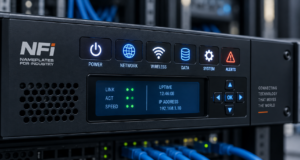
Routers, radios, network controls, and communication consoles may combine deadfront graphics, LEDs, switches, and display windows in one interface. The right design keeps information clear without making the panel look crowded.
NFI can build graphic overlays with display windows, integrated LEDs, backlighting, and deadfront features for membrane switch applications.
Material/Finish Selection for Backlit Overlays
Start with the way the product will be used.
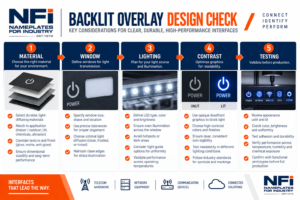
Polyester and polycarbonate are common materials for control panel overlays. Material choice can affect flex life, appearance, feel, and resistance to wear or cleaning.
Finish matters too. A gloss surface can make colors look bright, while matte or textured finishes can reduce glare.
Quick Material Check
- Will users press the panel often?
- Will it face cleaners or abrasion?
- Is glare a concern?
- Does the panel need clear interface windows?
- Will LEDs sit behind the overlay?
For more options, explore NFI custom faceplates and overlays.
Readability: Deadfront, Backlighting & Windows
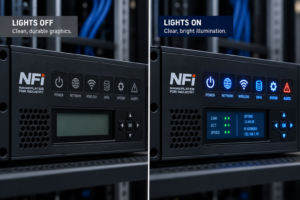
A good low-light interface should be easy to understand both when the lights are on and when they are off.
Deadfront graphics stay hidden or nearly hidden until light shines through them. This can keep an interface clean while showing alerts or functions only when needed. NFI can produce deadfront icons with colored windows and designs that appear when backlit.
Display windows let users see screens, LEDs, or status indicators below the overlay. Clear, tinted, anti-glare, or other window treatments may be considered based on the application.
For an LED interface panel, check:
- Is each icon easy to read?
- Does light spread evenly?
- Does light leak into nearby graphics?
- Is the display clear from normal viewing angles?
- Are key HMI graphics easy to understand?
These same rules apply to backlit membrane switches and other communication hardware overlays.
Failure Modes + Test Plan
A backlit panel may look good on a computer screen but act differently on real hardware.
Common problems include light bleed, dark spots, glare, weak contrast, poor window clarity, and graphics that remain too visible when a deadfront icon is off.
Interactive Test Checklist
Test the final assembly, not just the printed overlay.
- View the panel with the backlight off.
- Check every icon with the light on.
- Test in bright and dark rooms.
- Look for light leaks around nearby icons.
- Check display and LED window clarity.
- Test cleaning and repeated handling.
- Confirm overlay alignment on the real housing.
The best backlit overlays balance materials, lighting, graphics, and real-world use. Early testing can help teams find readability problems before production begins.
Contact NFI to discuss graphic overlays, backlit membrane switches, display windows, or HMI components for your next communication hardware project.